With the keyword analysis in SEOFuxx you find the keywords that are really worth it for your SEO strategy.
What is keyword research?
In keyword research you pick out the terms your target audience actually searches for. The right keywords are the foundation for everything else in search engine optimization.
Why real data?
The keyword analysis delivers Google data via the data provider, for example:
- Search volume: how often a keyword is searched per month
- CPC data: what advertisers pay for a click
- Competition: how strongly advertisers bid on the keyword
Start keyword research
- In your account, on the Projects tab, enter your domain and your keywords (see Account: Domain and Password)
- Open Keyword Analysis in the navigation
- The page evaluates the keywords of your project, you don't have to type anything in
The values apply to Google in Germany and the German language. They are cached for up to 7 days, and the date is shown below the figures. If the project or the domain is missing or no keywords are saved, you get a notice with the link Set up project.
Understanding the results
Main metrics
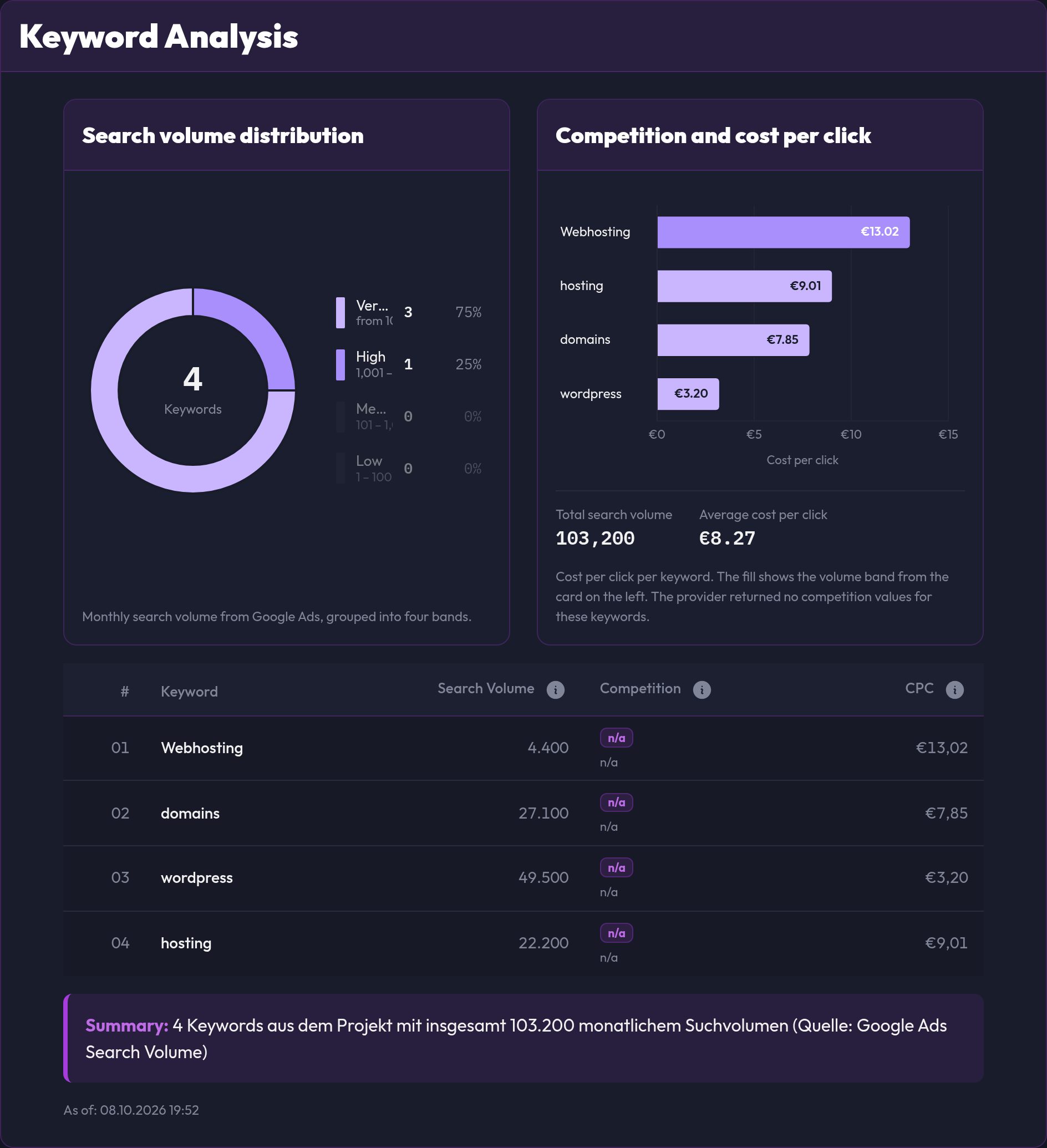
You get two charts (Search volume distribution in four levels and Competition and cost per click) and below them a sortable table with Keyword, Search Volume, Competition and CPC. This is what the values mean:
Search volume is the average number of searches per month. More volume means more possible visitors, but usually more competition as well.
CPC (cost per click) is the average price in Google Ads. A high CPC points to a commercially valuable keyword, a low one more to an informational keyword.
Competition tells you how many advertisers bid on the keyword (Low, Medium or High). With High there is a lot of money in the market.
Keyword types
Short-tail (1-2 words), for example "SEO": high search volume, high competition, and the search intent stays vague.
Mid-tail (3 words), for example "free SEO tools": medium volume, moderate competition, and the search intent is already more concrete.
Long-tail (4+ words), for example "best free SEO tools for small businesses": little volume and little competition, but a very clear search intent and usually a higher conversion rate.
Keyword strategies
The 80/20 rule
As a rule of thumb, about 80% of your keywords should be long-tail. They are easier to rank for, convert better and have less competition. The other 20% can be contested short-tail keywords, which are more long-term goals, help build the brand and have a lot of traffic potential.
Understanding search intent
Google roughly distinguishes four types of search intent:
Informational: the user wants to learn something, as with "What is SEO?". Blog articles, tutorials and guides fit.
Navigational: the user is looking for a specific website, for instance "SEOFuxx login". Homepage and landing pages fit.
Commercial: the user compares before buying, for instance "best SEO tools comparison". Comparisons, reviews and tests fit.
Transactional: the user wants to buy or get something done, for instance "buy SEO tool". Product pages, prices and calls to action fit.
Using SERP features
The keyword analysis does not show SERP features, you see them in the Google results themselves. These are the elements you should know:
Featured snippets
These are texts Google shows directly in the search results, at position 0 above all other hits. Structure your content with clear questions and answers and use lists and tables.
People Also Ask (PAA)
Here Google shows frequently asked questions on the topic. Work these questions into your content and answer them thoroughly.
Knowledge graph
These are the fact boxes to the right of the search results. Schema.org markup and a well-maintained Google Business Profile help here.
Image pack / video carousel
Image and video galleries in the search results. Optimize your images with alt text, and think about whether a video fits the topic.
Competitor analysis
Analyze top-ranking pages
The keyword analysis does not show top results. Who ranks first for your keyword is shown in the Page Audit in the Google TOP 3 card. Look more closely at the top 3 in particular:
- How long is the content (word count)?
- Which H2/H3 headings are used?
- How is the content built up?
- Which media are embedded, such as images or videos?
- Are there interactive elements like calculators or tools?
Creating keyword clusters
You group related keywords into topic clusters. An example for an SEO tools cluster:
Pillar content (main page): "SEO Tools: The Ultimate Guide" with the keyword "SEO tools" (volume: 5,000)
Cluster content (sub-pages):
- "Free SEO tools" (volume: 1,200)
- "SEO tools for beginners" (volume: 800)
- "SEO tools comparison" (volume: 600)
- "On-page SEO tools" (volume: 400)
Link all cluster pages to the pillar page (hub & spoke model).
Avoiding common mistakes
Choosing keywords that are too competitive
A startup that wants to rank for "insurance" (extremely contested) has hardly a chance. Better to focus on "home contents insurance for students" (far less competition).
Ignoring search volume
A keyword with 10 searches a month rarely repays the effort. Count on at least 100 searches a month.
Ignoring search intent
A product page for "What is SEO?" doesn't fit, because the question is informational. A detailed guide article belongs there.
Only short-tail keywords
If you only bet on "SEO", "marketing" and "tools", you'll hardly get anywhere. A mix of short-, mid- and long-tail is better.