Here you can see whether the selected AI search sources mention your brand, cite your website, and how you compare with competitors.
What is AI visibility?
More and more people put their questions straight to an AI instead of clicking through Google results. The answer often names only a few brands and sources. If you're missing there, these users won't find you, even with good classic rankings. Optimizing for this is called GEO (Generative Engine Optimization).
AI Visibility Tracking measures exactly that. It puts questions to AI platforms the way your audience would ask them (so-called prompts) and evaluates the answers.
These platforms are currently measured:
- ChatGPT (model API) (optional web search)
- Google AI Overview
- Perplexity (model API)
- Gemini (model API)
- Google AI Mode
- ChatGPT Search (captured web interface with web search)
Your plan limits the number of platforms in one measurement. You can select them in the measurement plan. Without a selection, the order starts with ChatGPT via the model API, Google AI Overview, Gemini and Perplexity, followed by Google AI Mode and ChatGPT Search. The model API does not measure the visible ChatGPT interface. Gemini has no country parameter, so its measurement is not tied to the country of your profile. A citation alone does not prove a visit or conversion.
How does this differ from SERP tracking?
| SERP tracking | AI visibility | |
|---|---|---|
| Question | Which position does my URL hold? | Is my brand named in the answer? |
| Result | Ranking 1-100 | Mentions, citations, market share |
| Result stable? | Largely yes | No - AI answers vary |
Because AI answers can differ with every query, all values are samples. SEOFuxx therefore repeats every prompt several times and states for each metric how many answers it is based on.
Prerequisites
- A domain stored as a project in your account
- A plan that includes AI visibility measurement
Without a plan you can prepare everything at your own pace (brand, competitors, prompts as drafts), but nothing is measured and no costs arise. Existing results remain fully visible even after a plan change.
Create a tracking profile
A profile measures exactly one market: one brand in one language and one country.
- Open AI Visibility in the navigation
- Click "Create profile"
- Choose the project to measure
- Enter the brand data:
- Brand name: as the brand is named in answers
- Domain: e.g.
your-website.com(with or withoutwww.- it is the same) - Aliases: other spellings, one alias per line (maximum 10)
- Language and country of the measurement
- Save the profile
Settings in detail
| Setting | Meaning |
|---|---|
| Repetitions per prompt | How often each question is asked. Every repetition costs one query. Below 2 the variation cannot be calculated; the default is 3. Up to 20 are possible, as far as your plan allows that many. More repetitions make the values more reliable. |
| Confidence threshold | Minimum certainty for a mention to count. Uncertain hits drop out of the metrics but stay viewable. |
| Retention of raw answers | In days (30 to 730). After that the answer text is removed; the measured values stay. |
| Status | Draft, Active or Paused. Only active profiles are measured automatically. |
Subdomains such as blog.your-website.com always count as part of your main domain.
Ambiguous brand names
If your brand is named like a common word (e.g. "Base" or "Post"), it would otherwise match in almost every answer. Enable "Brand name is also a common word" for this. A mention then only counts as certain if the answer also names your domain.
Add competitors
Without competitors there is no comparison. Under Competitors, enter the brands customers would compare you with: name, optionally domain and aliases.
- Maximum 5 competitors per profile
- At least 2 are recommended
- Competitors with common-word names have the "Ambiguous" option too
Create and approve prompts
Prompts are the questions put to the AI. Phrase them the way a prospect would actually type them:
- "Which SEO tools suit small businesses?"
- "What is better for keyword research: tool A or tool B?"
- "Which agency helps with local SEO in Hamburg?"
Every prompt has a type you can filter by later:
| Type | Example |
|---|---|
| Information | What should you know about Core Web Vitals? |
| Purchase intent | What are the best providers for SEO audits? |
| Comparison | Brand A or brand B - which fits better? |
| Local | Who offers SEO in my city? |
| Brand | What is brand A and what is it known for? |
Optionally assign a topic to group prompts.
Rules for prompts:
- 10 to 500 characters
- No personal data (email addresses, phone numbers, IBAN, credit card numbers). The prompt is sent to an external provider and processed there.
- Duplicate prompts are detected, even with different capitalization or punctuation
- The number of prompts you can approve depends on your plan
Pause takes a prompt out of the measurement without losing its measured values. Delete removes the prompt together with all its measured values.
Suggestions from your keywords
Below the prompts, SEOFuxx offers suggestions built from the keywords of your project. They are grouped by prompt type and worded in the language of your profile. Some are preselected, one type after the other, at most ten and never more than your quota still allows. Comparison prompts only exist if you have added competitors, local ones only once you enter a place in the field Location for local prompts (optional).
If you have connected Search Console, suggestions from real search queries of your website are added. We use the property that matches the domain of your project and your search queries of the last 90 days. Only queries with at least 10 impressions count, and queries containing your brand are left out because they say nothing about your visibility. Questions are taken over unchanged, queries such as "best ..." or "... prices" as a short question, otherwise suggestions come from the templates. These suggestions carry the Search Console marker and come before the keyword suggestions. Without a connection you find the button Connect Search Console in the section. The search queries are not stored, only what you create as a draft.
With Create selected as drafts you take over the ticked suggestions. They land in the list as drafts, cost nothing and are only measured once you approve them. What already exists does not show up again. If your project has no keywords yet, add them in your account and suggestions will appear here.
When is it measured?
Active profiles are measured automatically once a week, provided your plan includes weekly measurement. One measurement is called a run. All answers of a run are produced with the same parameters (platform, model, language, country) so that runs stay comparable.
The result isn't there immediately. The answers are collected from the platforms in the background, and that can take a few minutes. You can see the status under Latest measurement runs:
| Status | Meaning |
|---|---|
| Queued | The run is waiting to start |
| Submitted / Processing | The answers are being collected |
| Completed | All answers are in |
| Partially completed | Individual queries failed |
| Failed / Cancelled | The run delivers no values |
Costs and budgets
Every answer costs money at the data provider. That's why there are hard limits: the daily, monthly and per-run budget of your plan. Once a limit is reached, no further measurement starts and no further costs arise. The platforms cost different amounts per answer, so more platforms or repetitions make a measurement more expensive.
Under Plan and budget you can see your plan, its limits, the budget used so far and the costs of the profile so far.
Understanding the analysis
The Analysis tab shows the dashboard of the selected profile. At the top you filter by period (30 days, 90 days, 12 months, all time), platform and prompt type.
Metrics
| Metric | Meaning |
|---|---|
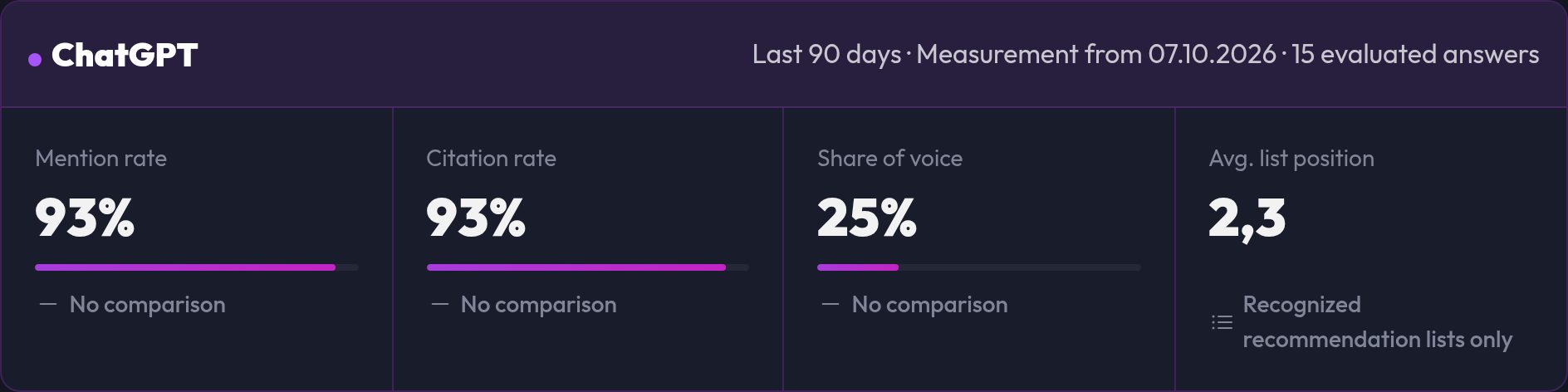
| Mention rate | Share of answers in which your brand is named |
| Citation rate | Share of answers that cite your domain as a source |
| Share of voice | Your share of all brand mentions (you and your competitors) |
| Avg. list position | Average rank in answers that contain an ordered recommendation list |
Every value comes with its sample size, e.g. "7 of 12 valid answers". Values that cannot be measured appear as "–", never as 0. A list position only exists if the answer really contains a ranking.
Below the value you see the change versus the comparison run in percentage points. If measurement parameters such as the country have changed, no comparison is shown ("No comparison") instead of presenting an apparent change.
Below mention rate, citation rate and share of voice there is a 95% range. The actual value lies within it with 95% certainty, and the more answers there are, the narrower it gets. A trend arrow only turns green or red if the ranges of now and before do not overlap. Otherwise it stays grey and carries the note not reliable. For share of voice the range counts mentions instead of answers and is only an approximation: several mentions come from the same answer, so the range tends to come out too narrow.
History
The chart shows the selected metric per platform over time. Below it, the same series appears as a table by date and platform.
Competitive comparison
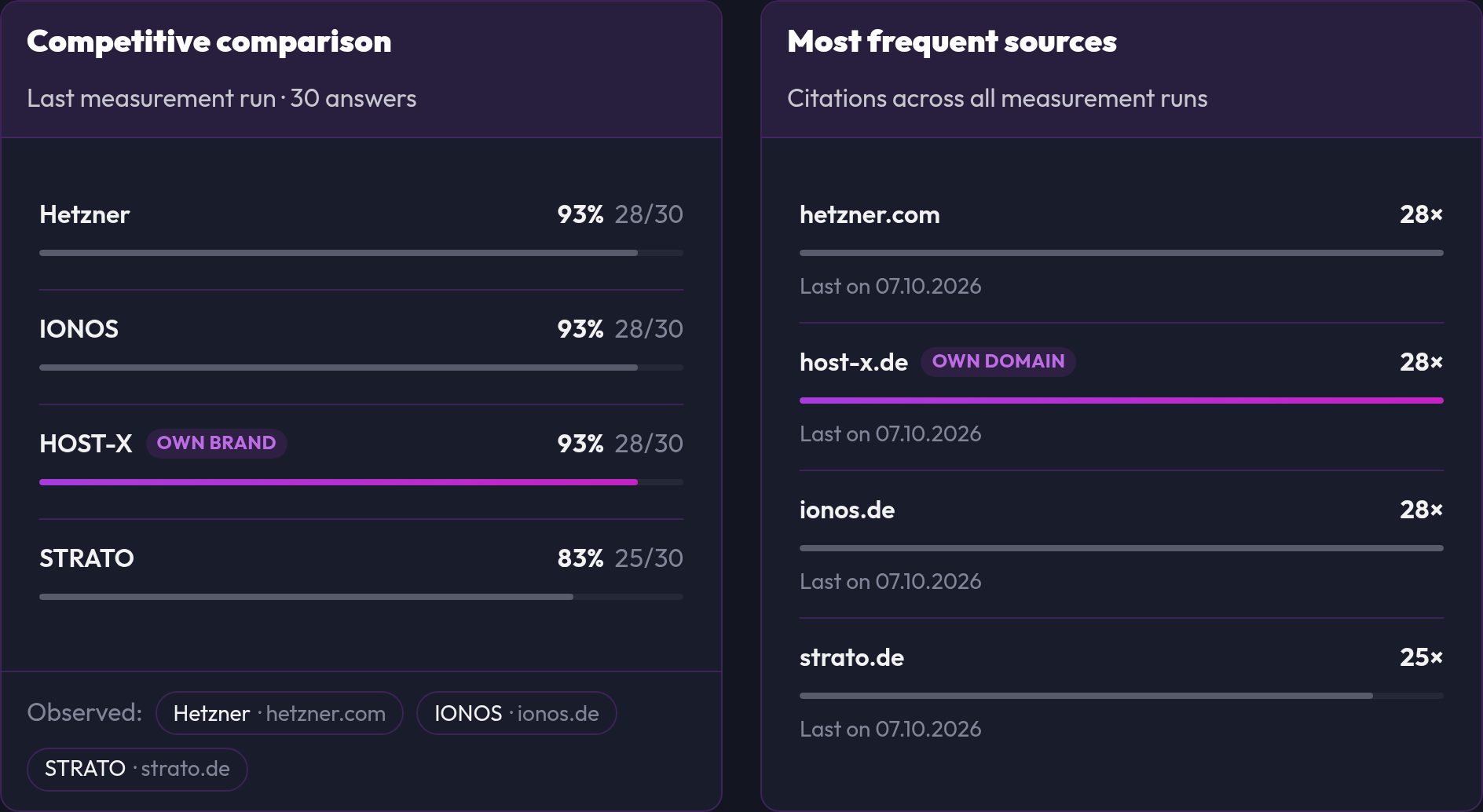
Shows for the latest run which brands were named in the answers and how often. Your own brand is highlighted.
Most frequent sources
Shows which domains the AI cites most often, including competitors and portals. These are your starting points: you should be present on these pages or offer comparable content. Next to each domain you see what kind of source it is, such as Forum / community, Comparison portal, Wikipedia, media, competitor or your own domain. The classification works with domain lists and name patterns. What is not recognised stays without a type.
Source mix by platform
Shows, per platform, which types of source the cited sources come from, as a share. The source structure differs a lot between AIs, which is why each platform stands on its own.
Source gaps
These are third-party sources cited in valid answers where the answer does not name your brand. Each row shows in how many answers with that source you are missing, and an Action that fits the source type, such as a forum post, a listing on the comparison portal or a guest article in a media outlet. Whether your brand appears on the page itself is not checked by the analysis.
Tone of mentions
Shows how your brand sounds in the sentence where it is named: Positive, Neutral or Negative, with share, sample size and 95% range. This is an estimate from word lists, not a verdict on the whole answer. It does not detect irony or comparisons, and a mention without a recognisable signal counts as neutral. These values are not part of share of voice.
Prompts and results
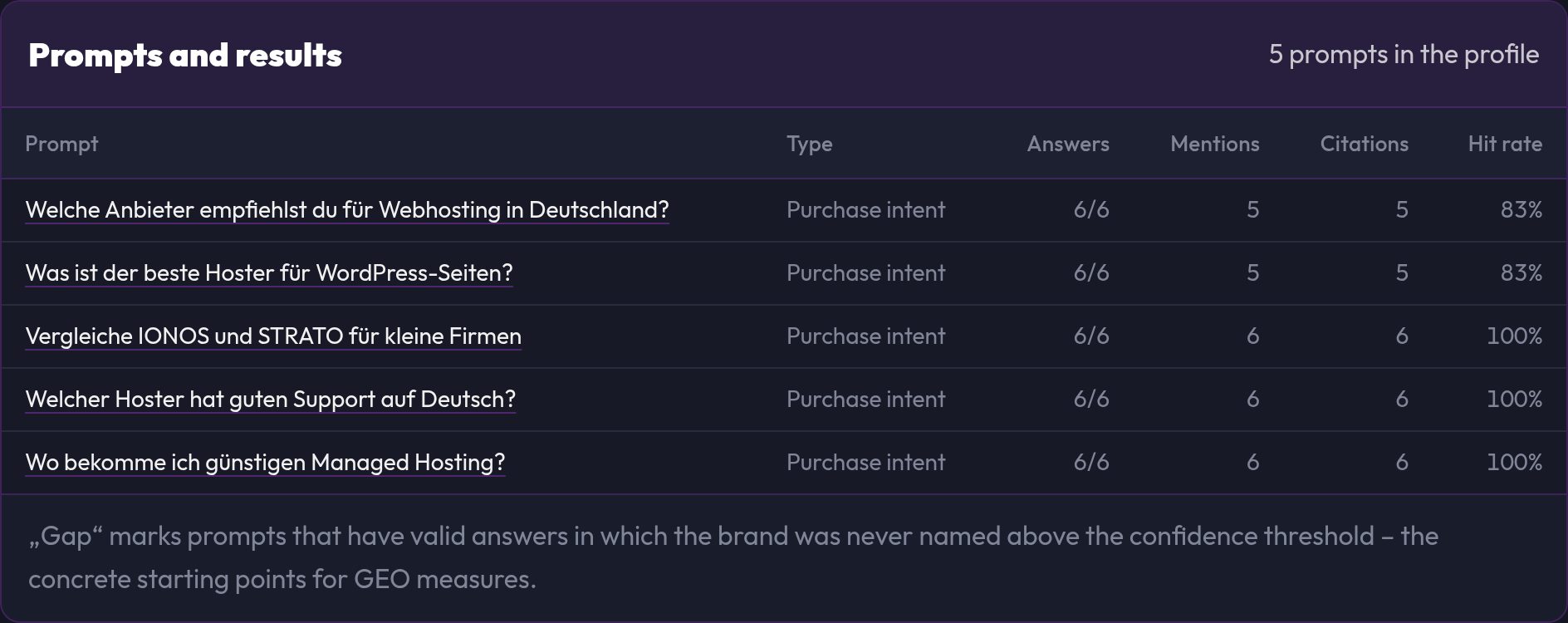
For each prompt you see mentions, citations and the hit rate. The Gap marker appears on prompts that have valid answers but in which your brand was never named. These are the concrete topics for which you should create or improve content. The Stability column shows whether the same question always turns out the same when repeated within one run on the same platform. Unstable means at least a quarter of the answers differ from the majority outcome, so the brand shows up sometimes and sometimes not. It is better to give such prompts less weight or more repetitions. A "–" means there was no repetition in the period.
Answer records
View record opens a single answer: the full text with highlighted hits, the detected brands with their confidence, the cited sources and the measurement parameters. This lets you trace every metric back to the original answer.
The prompt filter applies to prompts, records and sources. The metrics stay profile-wide because they are aggregated per measurement day.
Email on a drop
If the mention rate of a platform drops sharply, we send an email to your account address after the run. That only happens if the rate is at least 15 percentage points below the measurement before, both measurements have at least 6 valid answers and the 95% ranges do not overlap. Normal fluctuation triggers nothing. At most one email per run is sent, and only for active profiles.
Reading results correctly
- Variation is normal. A single run says little. Watch the trend over several weeks.
- Interpret small samples carefully. With few valid answers a value can jump sharply. Always check the sample size. The range below the value shows how uncertain it is.
- Failed answers are reported separately and do not distort the metrics.
- No overall grade. There is deliberately no score from 0 to 100. You see the raw values with their origin.
Changes to brand, aliases or threshold apply from the next measurement. Metrics already stored are not rewritten retroactively.
Demo data
If the analysis shows the notice "Demo view" or "Contains demo data", some values come from a fixed sample data set for preview. No AI provider was queried for them.
Retrieve data via the API
The metrics can be retrieved read-only via the API, e.g. for your own dashboards or reports. You need an API key for this (see the API v1 quickstart):
curl -H "Authorization: Bearer sfx_..." \
"https://www.seofuxx.com/api/v1/ai-visibility?profile=3&days=90"| Parameter | Meaning |
|---|---|
profile |
Optional: only this profile |
days |
Period in days, 1 to 730, default 90 |
The response contains the daily metrics per platform for each profile. Values that cannot be measured are null, never 0. The endpoint is read-only and rate-limited. You change profiles and prompts only in the interface.
How to improve your visibility
- Close gaps: create content for prompts where your brand is missing
- Analyze cited sources: which pages does the AI use? Being listed there or offering similar content raises your chances
- Clear, verifiable statements: AI systems cite pages with unambiguous facts, figures and definitions
- Make the brand unambiguous: consistent name, legal notice, organization markup
- Check the technology: a clean site without crawling hurdles remains a prerequisite (see Understanding SEO analyses)
- Measure the effect: after a few weeks it's worth comparing mention rate and citation rate
Frequently asked questions
There are no measured values yet
Check that the profile is set to Active, at least one prompt is approved, your plan allows measurements and budget is left. After a run starts it takes a few minutes until the answers are in.
The value changes for no reason
AI answers are not deterministic. Increase the repetitions per prompt (up to 20, if your plan allows it), watch the 95% range or judge the trend instead of single runs.
My brand is named but does not count
The mention is probably below the confidence threshold, for example with a common-word name without a domain. Add suitable aliases or check the answer record.
Can I get around my plan's limit?
No. All limits are checked server-side, including via the API.
Is my prompt stored?
Yes, in the profile. The answer text is deleted after the configured retention period; the measured values stay.